Guidelines to Choosing the Right Laptop for you.
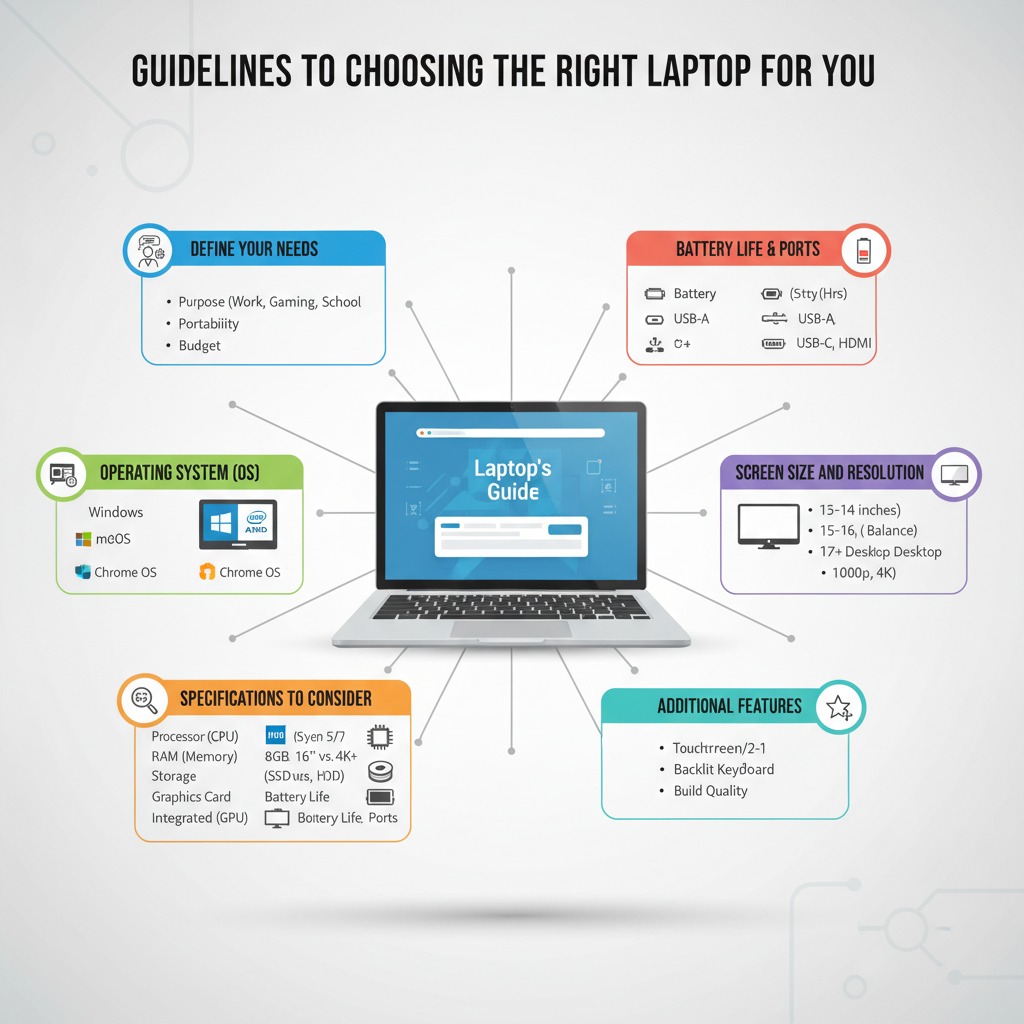
Choosing the right laptop requires balancing performance, portability, battery life, display quality, and budget. A laptop that is perfect for one person may be unsuitable for another. Students often prioritize affordability and battery life, while gamers need powerful graphics hardware and professionals value reliability and security. Understanding the main hardware components makes it easier to buy a device that remains useful for years.
Choosing the right laptop requires balancing performance, portability, battery life, display quality, and budget. A laptop that is perfect for one person may be unsuitable for another. Students often prioritize affordability and battery life, while gamers need powerful graphics hardware and professionals value reliability and security. Understanding the main hardware components makes it easier to buy a device that remains useful for years.
Choosing the right laptop requires balancing performance, portability, battery life, display quality, and budget. A laptop that is perfect for one person may be unsuitable for another. Students often prioritize affordability and battery life, while gamers need powerful graphics hardware and professionals value reliability and security. Understanding the main hardware components makes it easier to buy a device that remains useful for years.
Choosing the right laptop requires balancing performance, portability, battery life, display quality, and budget. A laptop that is perfect for one person may be unsuitable for another. Students often prioritize affordability and battery life, while gamers need powerful graphics hardware and professionals value reliability and security. Understanding the main hardware components makes it easier to buy a device that remains useful for years.
Choosing the right laptop requires balancing performance, portability, battery life, display quality, and budget. A laptop that is perfect for one person may be unsuitable for another. Students often prioritize affordability and battery life, while gamers need powerful graphics hardware and professionals value reliability and security. Understanding the main hardware components makes it easier to buy a device that remains useful for years.
Choosing the right laptop requires balancing performance, portability, battery life, display quality, and budget. A laptop that is perfect for one person may be unsuitable for another. Students often prioritize affordability and battery life, while gamers need powerful graphics hardware and professionals value reliability and security. Understanding the main hardware components makes it easier to buy a device that remains useful for years.
Choosing the right laptop requires balancing performance, portability, battery life, display quality, and budget. A laptop that is perfect for one person may be unsuitable for another. Students often prioritize affordability and battery life, while gamers need powerful graphics hardware and professionals value reliability and security. Understanding the main hardware components makes it easier to buy a device that remains useful for years.
Choosing the right laptop requires balancing performance, portability, battery life, display quality, and budget. A laptop that is perfect for one person may be unsuitable for another. Students often prioritize affordability and battery life, while gamers need powerful graphics hardware and professionals value reliability and security. Understanding the main hardware components makes it easier to buy a device that remains useful for years.
Budget Laptops
Budget laptops are designed for web browsing, office work, streaming, and light productivity. Look for modern processors, at least 8 GB RAM, and a solid-state drive. Avoid paying for features you will never use. Compare prices, read reviews, and consider refurbished models from reputable sellers for additional value.
Budget laptops are designed for web browsing, office work, streaming, and light productivity. Look for modern processors, at least 8 GB RAM, and a solid-state drive. Avoid paying for features you will never use. Compare prices, read reviews, and consider refurbished models from reputable sellers for additional value.
Budget laptops are designed for web browsing, office work, streaming, and light productivity. Look for modern processors, at least 8 GB RAM, and a solid-state drive. Avoid paying for features you will never use. Compare prices, read reviews, and consider refurbished models from reputable sellers for additional value.
Budget laptops are designed for web browsing, office work, streaming, and light productivity. Look for modern processors, at least 8 GB RAM, and a solid-state drive. Avoid paying for features you will never use. Compare prices, read reviews, and consider refurbished models from reputable sellers for additional value.
Budget laptops are designed for web browsing, office work, streaming, and light productivity. Look for modern processors, at least 8 GB RAM, and a solid-state drive. Avoid paying for features you will never use. Compare prices, read reviews, and consider refurbished models from reputable sellers for additional value.
Budget laptops are designed for web browsing, office work, streaming, and light productivity. Look for modern processors, at least 8 GB RAM, and a solid-state drive. Avoid paying for features you will never use. Compare prices, read reviews, and consider refurbished models from reputable sellers for additional value.
Student Laptops
Students benefit from lightweight laptops with long battery life, comfortable keyboards, reliable Wi-Fi, and enough storage for assignments. A Full HD display and 8–16 GB RAM provide a good experience for most academic work.
Students benefit from lightweight laptops with long battery life, comfortable keyboards, reliable Wi-Fi, and enough storage for assignments. A Full HD display and 8–16 GB RAM provide a good experience for most academic work.
Students benefit from lightweight laptops with long battery life, comfortable keyboards, reliable Wi-Fi, and enough storage for assignments. A Full HD display and 8–16 GB RAM provide a good experience for most academic work.
Students benefit from lightweight laptops with long battery life, comfortable keyboards, reliable Wi-Fi, and enough storage for assignments. A Full HD display and 8–16 GB RAM provide a good experience for most academic work.
Students benefit from lightweight laptops with long battery life, comfortable keyboards, reliable Wi-Fi, and enough storage for assignments. A Full HD display and 8–16 GB RAM provide a good experience for most academic work.
Students benefit from lightweight laptops with long battery life, comfortable keyboards, reliable Wi-Fi, and enough storage for assignments. A Full HD display and 8–16 GB RAM provide a good experience for most academic work.
Gaming Laptops
Gaming laptops require dedicated graphics processors, efficient cooling, high-refresh-rate displays, and fast SSD storage. Consider future needs, game requirements, and portability before purchasing.
Gaming laptops require dedicated graphics processors, efficient cooling, high-refresh-rate displays, and fast SSD storage. Consider future needs, game requirements, and portability before purchasing.
Gaming laptops require dedicated graphics processors, efficient cooling, high-refresh-rate displays, and fast SSD storage. Consider future needs, game requirements, and portability before purchasing.
Gaming laptops require dedicated graphics processors, efficient cooling, high-refresh-rate displays, and fast SSD storage. Consider future needs, game requirements, and portability before purchasing.
Gaming laptops require dedicated graphics processors, efficient cooling, high-refresh-rate displays, and fast SSD storage. Consider future needs, game requirements, and portability before purchasing.
Gaming laptops require dedicated graphics processors, efficient cooling, high-refresh-rate displays, and fast SSD storage. Consider future needs, game requirements, and portability before purchasing.
Business Laptops
Business laptops emphasize durability, security features, dependable keyboards, webcams, fingerprint readers, and long battery life. Enterprise support and warranties can reduce downtime.
Business laptops emphasize durability, security features, dependable keyboards, webcams, fingerprint readers, and long battery life. Enterprise support and warranties can reduce downtime.
Business laptops emphasize durability, security features, dependable keyboards, webcams, fingerprint readers, and long battery life. Enterprise support and warranties can reduce downtime.
Business laptops emphasize durability, security features, dependable keyboards, webcams, fingerprint readers, and long battery life. Enterprise support and warranties can reduce downtime.
Business laptops emphasize durability, security features, dependable keyboards, webcams, fingerprint readers, and long battery life. Enterprise support and warranties can reduce downtime.
Business laptops emphasize durability, security features, dependable keyboards, webcams, fingerprint readers, and long battery life. Enterprise support and warranties can reduce downtime.
Processor Comparison
Intel Core and AMD Ryzen processors are suitable for most users, while Apple M-series chips provide excellent efficiency for compatible software. Entry-level users can choose Core i3 or Ryzen 3, mainstream users benefit from Core i5/Ryzen 5, and demanding workloads are better served by Core i7/i9 or Ryzen 7/9.
Intel Core and AMD Ryzen processors are suitable for most users, while Apple M-series chips provide excellent efficiency for compatible software. Entry-level users can choose Core i3 or Ryzen 3, mainstream users benefit from Core i5/Ryzen 5, and demanding workloads are better served by Core i7/i9 or Ryzen 7/9.
Intel Core and AMD Ryzen processors are suitable for most users, while Apple M-series chips provide excellent efficiency for compatible software. Entry-level users can choose Core i3 or Ryzen 3, mainstream users benefit from Core i5/Ryzen 5, and demanding workloads are better served by Core i7/i9 or Ryzen 7/9.
Intel Core and AMD Ryzen processors are suitable for most users, while Apple M-series chips provide excellent efficiency for compatible software. Entry-level users can choose Core i3 or Ryzen 3, mainstream users benefit from Core i5/Ryzen 5, and demanding workloads are better served by Core i7/i9 or Ryzen 7/9.
Intel Core and AMD Ryzen processors are suitable for most users, while Apple M-series chips provide excellent efficiency for compatible software. Entry-level users can choose Core i3 or Ryzen 3, mainstream users benefit from Core i5/Ryzen 5, and demanding workloads are better served by Core i7/i9 or Ryzen 7/9.
Intel Core and AMD Ryzen processors are suitable for most users, while Apple M-series chips provide excellent efficiency for compatible software. Entry-level users can choose Core i3 or Ryzen 3, mainstream users benefit from Core i5/Ryzen 5, and demanding workloads are better served by Core i7/i9 or Ryzen 7/9.
Intel Core and AMD Ryzen processors are suitable for most users, while Apple M-series chips provide excellent efficiency for compatible software. Entry-level users can choose Core i3 or Ryzen 3, mainstream users benefit from Core i5/Ryzen 5, and demanding workloads are better served by Core i7/i9 or Ryzen 7/9.
RAM
RAM affects multitasking. Eight gigabytes is adequate for everyday work, sixteen gigabytes is recommended for students and professionals, while thirty-two gigabytes or more is useful for software development, engineering, and content creation.
RAM affects multitasking. Eight gigabytes is adequate for everyday work, sixteen gigabytes is recommended for students and professionals, while thirty-two gigabytes or more is useful for software development, engineering, and content creation.
RAM affects multitasking. Eight gigabytes is adequate for everyday work, sixteen gigabytes is recommended for students and professionals, while thirty-two gigabytes or more is useful for software development, engineering, and content creation.
RAM affects multitasking. Eight gigabytes is adequate for everyday work, sixteen gigabytes is recommended for students and professionals, while thirty-two gigabytes or more is useful for software development, engineering, and content creation.
RAM affects multitasking. Eight gigabytes is adequate for everyday work, sixteen gigabytes is recommended for students and professionals, while thirty-two gigabytes or more is useful for software development, engineering, and content creation.
Storage
NVMe SSDs offer much faster performance than traditional hard drives. A 512 GB SSD suits many users, while gamers and creators may prefer 1 TB or more.
NVMe SSDs offer much faster performance than traditional hard drives. A 512 GB SSD suits many users, while gamers and creators may prefer 1 TB or more.
NVMe SSDs offer much faster performance than traditional hard drives. A 512 GB SSD suits many users, while gamers and creators may prefer 1 TB or more.
NVMe SSDs offer much faster performance than traditional hard drives. A 512 GB SSD suits many users, while gamers and creators may prefer 1 TB or more.
NVMe SSDs offer much faster performance than traditional hard drives. A 512 GB SSD suits many users, while gamers and creators may prefer 1 TB or more.
Battery Life
Battery life depends on screen brightness, processor efficiency, workload, and battery capacity. Lower brightness, efficient power settings, and updated software can extend runtime.
Battery life depends on screen brightness, processor efficiency, workload, and battery capacity. Lower brightness, efficient power settings, and updated software can extend runtime.
Battery life depends on screen brightness, processor efficiency, workload, and battery capacity. Lower brightness, efficient power settings, and updated software can extend runtime.
Battery life depends on screen brightness, processor efficiency, workload, and battery capacity. Lower brightness, efficient power settings, and updated software can extend runtime.
Battery life depends on screen brightness, processor efficiency, workload, and battery capacity. Lower brightness, efficient power settings, and updated software can extend runtime.
Buying Tips
Set a realistic budget, identify your primary use case, read trusted reviews, compare specifications, check keyboard comfort, inspect display quality, verify upgrade options, understand warranty terms, and purchase from reputable retailers.
Set a realistic budget, identify your primary use case, read trusted reviews, compare specifications, check keyboard comfort, inspect display quality, verify upgrade options, understand warranty terms, and purchase from reputable retailers.
Set a realistic budget, identify your primary use case, read trusted reviews, compare specifications, check keyboard comfort, inspect display quality, verify upgrade options, understand warranty terms, and purchase from reputable retailers.
Set a realistic budget, identify your primary use case, read trusted reviews, compare specifications, check keyboard comfort, inspect display quality, verify upgrade options, understand warranty terms, and purchase from reputable retailers.
Set a realistic budget, identify your primary use case, read trusted reviews, compare specifications, check keyboard comfort, inspect display quality, verify upgrade options, understand warranty terms, and purchase from reputable retailers.
Set a realistic budget, identify your primary use case, read trusted reviews, compare specifications, check keyboard comfort, inspect display quality, verify upgrade options, understand warranty terms, and purchase from reputable retailers.
Set a realistic budget, identify your primary use case, read trusted reviews, compare specifications, check keyboard comfort, inspect display quality, verify upgrade options, understand warranty terms, and purchase from reputable retailers.
Conclusion
The best laptop is the one that matches your needs rather than the most expensive model. By understanding processors, memory, storage, graphics, battery life, and intended use, you can make a confident purchase that offers strong value and dependable performance for years.
The best laptop is the one that matches your needs rather than the most expensive model. By understanding processors, memory, storage, graphics, battery life, and intended use, you can make a confident purchase that offers strong value and dependable performance for years.
The best laptop is the one that matches your needs rather than the most expensive model. By understanding processors, memory, storage, graphics, battery life, and intended use, you can make a confident purchase that offers strong value and dependable performance for years.
The best laptop is the one that matches your needs rather than the most expensive model. By understanding processors, memory, storage, graphics, battery life, and intended use, you can make a confident purchase that offers strong value and dependable performance for years.
The best laptop is the one that matches your needs rather than the most expensive model. By understanding processors, memory, storage, graphics, battery life, and intended use, you can make a confident purchase that offers strong value and dependable performance for years.
The best laptop is the one that matches your needs rather than the most expensive model. By understanding processors, memory, storage, graphics, battery life, and intended use, you can make a confident purchase that offers strong value and dependable performance for years.